
SRB Workspaces: SAP Single Entry Point with Practical Extras


As a central access point to the ERP, the SAP Launchpad offers a lot, but its role-based perspective sometimes has drawbacks. We eliminate these at SRB. The name for this: SRB Workspaces.
Anyone working in SAP ERP cannot avoid the SAP Fiori Launchpad. As a central, clear access point to the relevant functions of the system, the solution has made a name for itself. And rightly so.
The structural approach behind the SAP Launchpad is role-based and non-hierarchical. Everyone gets their own personal SAP view, tailored to their specific area of responsibility via SAP roles. However, this access is not always the most efficient for users and administrators.
Some roles require jumps to functions that are already in a certain context – which in turn depends on the users and their assigned shift or focus, i.e., which production line they are currently in. Additionally, data is often made available in a cumbersome manner due to the purely role-based design of the SAP Launchpad and cannot be presented hierarchically.
SRB Workspaces Turn Perspective Around This is where SRB Workspaces come into play. They complement and extend the SAP Launchpad and eliminate the disadvantages of the role-based approach. Unlike SAP solutions, they have a hierarchical and object-oriented perspective, thus enabling individual overview data and SAP access points for specific tasks. This way, SRB Workspaces provide the appropriate context and a clear structure for SAP applications for every request. And always tailored to the individual working in the system.
Would you like an example? Let's take maintenance. A maintenance process for a specific plant is initiated.
In the SRB Workspaces, users control the process via hierarchical navigation from the plant down to the equipment. In this context, they execute the function to start the maintenance process. Since the function is executed in the chosen context by this specific user, the input fields for the technical object, the processing team (depending on the users), and other standard values are automatically pre-filled.
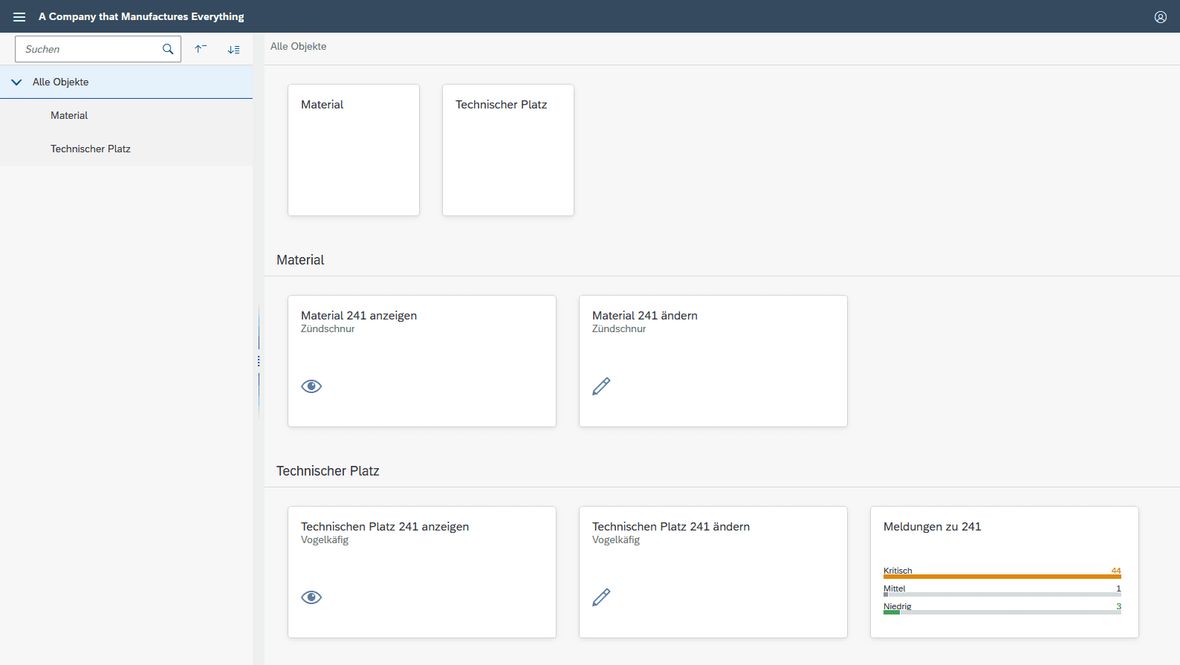
And because one workspace is often not enough, multiple workspaces can certainly be managed on one system, as the following example from the HR area shows.
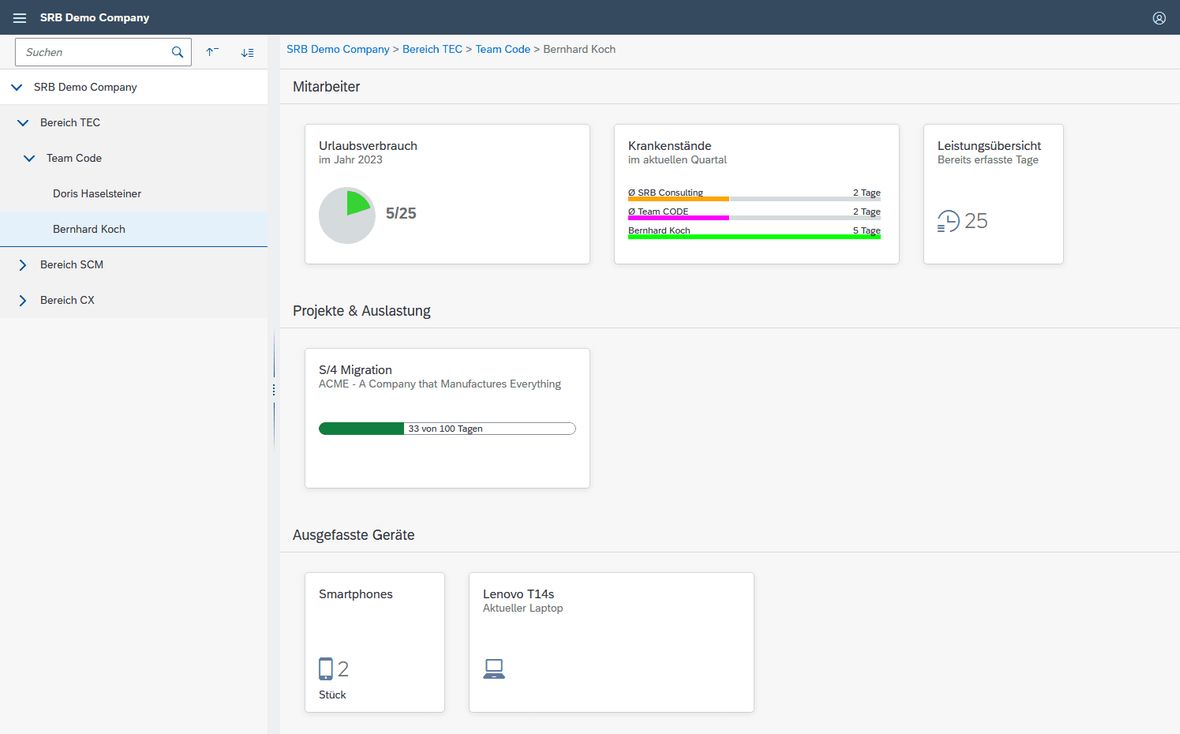
Simple Configuration for a Dynamic Dashboard The configuration of the individual workspaces is carried out via a view cluster using SAPGUI. Simply put, a workspace consists of a hierarchy, various groups, and individual tiles. Different groups can be assigned to each level of a hierarchy, and tiles can be assigned to the groups. The groups place the tiles in a common context.

Flexibility and reusability are created by allowing tiles to be assigned to as many groups as needed, and groups can in turn be assigned to as many hierarchy levels as necessary. And this also spans across different workspaces.
Although the customisation of the SRB Workspaces may seem static at first glance, various extension options and dynamic content are supported. This allows a workspace to be transformed into an interactive dashboard. Various charts provide the opportunity to graphically represent periodically updated data – clearly and structured, of course. The data is retrieved from the backend, and knowledge of interface development is not necessary. For each chart, only one ABAP-OO class needs to be implemented at the backend, which retrieves and provides the corresponding data. Example implementations can be viewed in our GitHub Repository.
Flexibly Extendable and Customisable In addition to the charts, customisation can be adjusted through Business Add-Ins, or BAdIs. This allows the SRB Workspaces to change or hide tiles or hierarchies based on permissions, roles, or user settings. For example, if we stick with the HR scenario shown above, it becomes possible to display details about their employees to a team leader while individual team members can only view their own data.
Development takes place at the backend in ABAP. This allows access to the entire data set of the system, thus enabling the creation of dynamic workspaces.
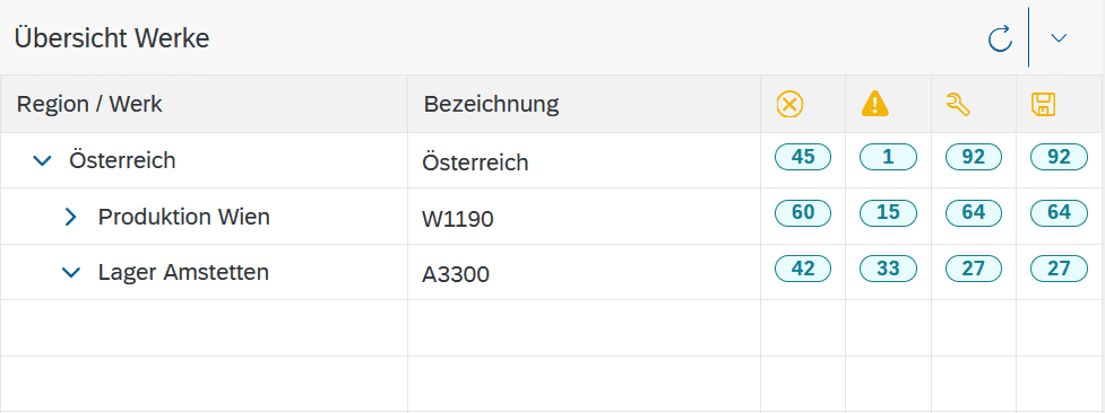
Finally, the frontend can also be customised. This creates the possibility to enrich the standard navigation tree with additional information. Your SRB Workspaces could look like this:
Want more details? Our webinar provides insights! “Is that really all there is?” you may ask? I can reassure you. That is far from everything. The SRB Workspaces offer several more technical refinements. However, these would exceed the scope of this blog article. If you want to know more, feel free to contact me or my colleague Manfred Scheiner directly or sign up for our SRB Workspaces Webinar on 24 March at 10:00 AM, as part of our SRB Webinar Week. We are already looking forward to seeing you and your questions.


