
Baby product manufacturer all grown up: MAM Reporting is live!

Multiple sources, one reporting – this summarises the ambitious SAP Datasphere project with baby product manufacturer MAM. Read here what lies behind it and what successes have been achieved.
As of January 1, 2025, MAM has gone live with SAP S/4HANA Private Cloud, Datasphere, and SAP Analytics Cloud (SAC).
We have already reported on Datasphere in thisblog post. Today, we would like to broaden our perspective to the overall reporting.
And how this now looks at MAM, I would like to briefly outline here.
MAM Reporting in SAP – an overview
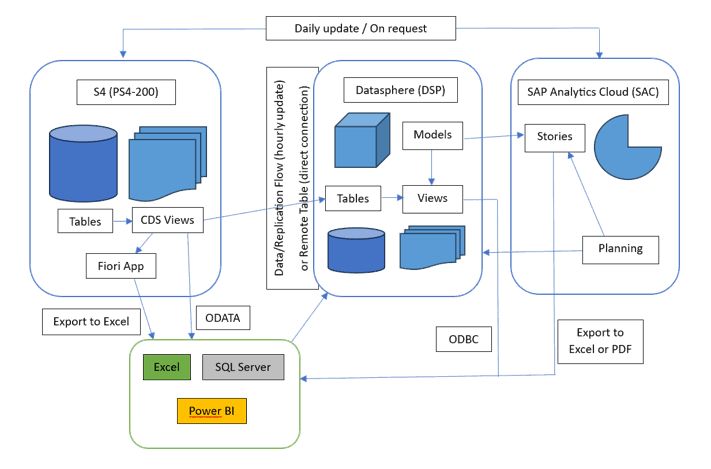
The main data source for MAM Reporting is S/4. Processed via CDS Views, the data is loaded into Datasphere for further processing or passed live. At least in most cases.
As can also be seen in the graphic, data is consumed in various ways – depending on the target audience and application area. In some cases, the good old Excel sheet is simply the best way, in another case Power BI. All of this must be represented – and it will be. However, these are 'exotics', as it can be clearly stated: SAC is the number 1 evaluation tool. Here, planning and representation take place.
So far, the first overview. Let’s now go into a bit more detail.
Datasphere as a data hub
Datasphere is the central data hub for MAM. Everything comes together here. MAM has a two-tier system: a development Datasphere and a productive Datasphere.
There are several spaces, for example:
- ‘MAM’ Space:This central space serves as the basis for the S/4 data and maintains the connections to the source systems. From here, it is then shared into the other spaces.
- Branch spaces:It has proven wise to create a separate space for each branch. Specific data structures are represented here, which can then be easily provided with the corresponding access only for that branch.
- Planning space:The planning data coming from SAC is kept in a separate space. This currently works via import.
- Permission tables space:The permission tables are stored in a separate space. Only a few employees from headquarters have access here.
- SAP content space:This is where SAP content lands when it is activated.
- Test space:This is space for 'play'.
You can see what such a data model in a space can look like here. These are the material movements, with all underlying tables & views – represented via the Dependency Analysis to the Analytic Model.
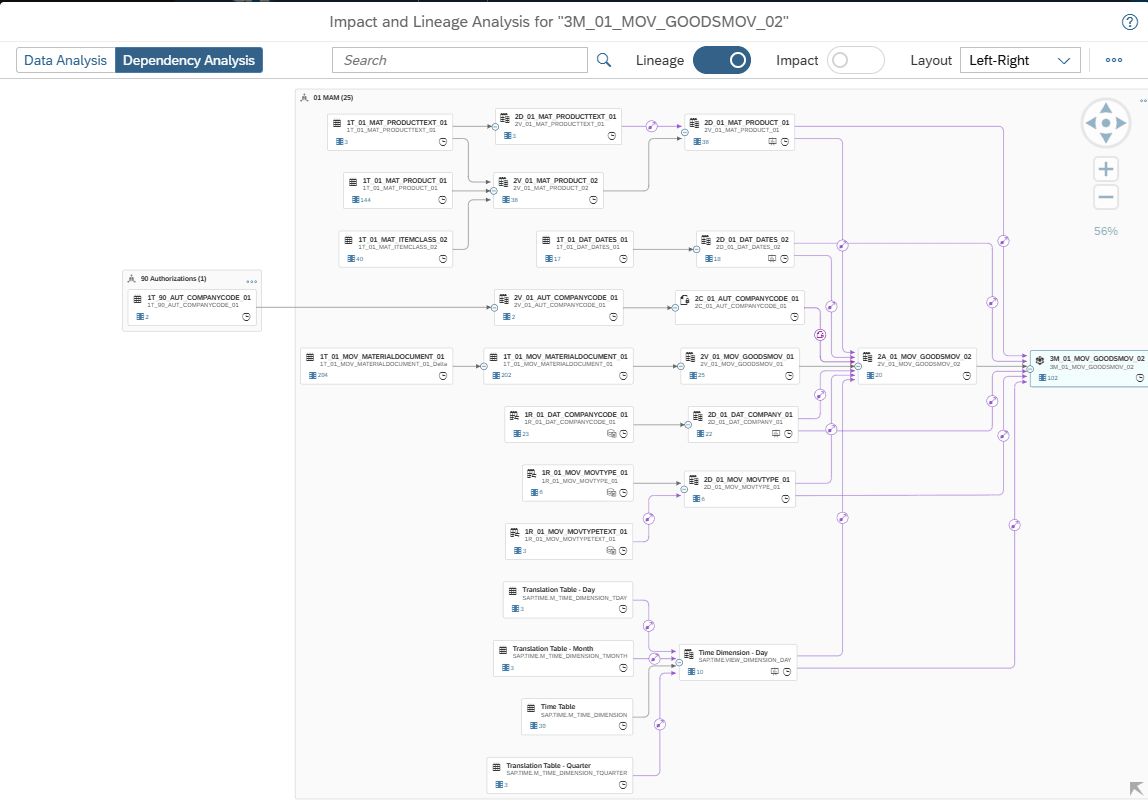
The system is very well structured and cleanly built, thanks to clear development guidelines. In the central space, there are 248 tables (both local and remote), 231 views (graphical and SQL), and 21 analytic models. And there are continuously more.
SAC as a planning and reporting tool
SAC serves as both a planning and reporting tool. MAM relies on a three-tier system:
- Public development tenant:This is where development and testing take place.
- Private (dedicated) test tenant:The dedicated tenant offers the opportunity to receive updates several weeks in advance for prior testing. This is especially important for planning.
- Public productive tenant:This tenant contains all finished stories and the productive planning.
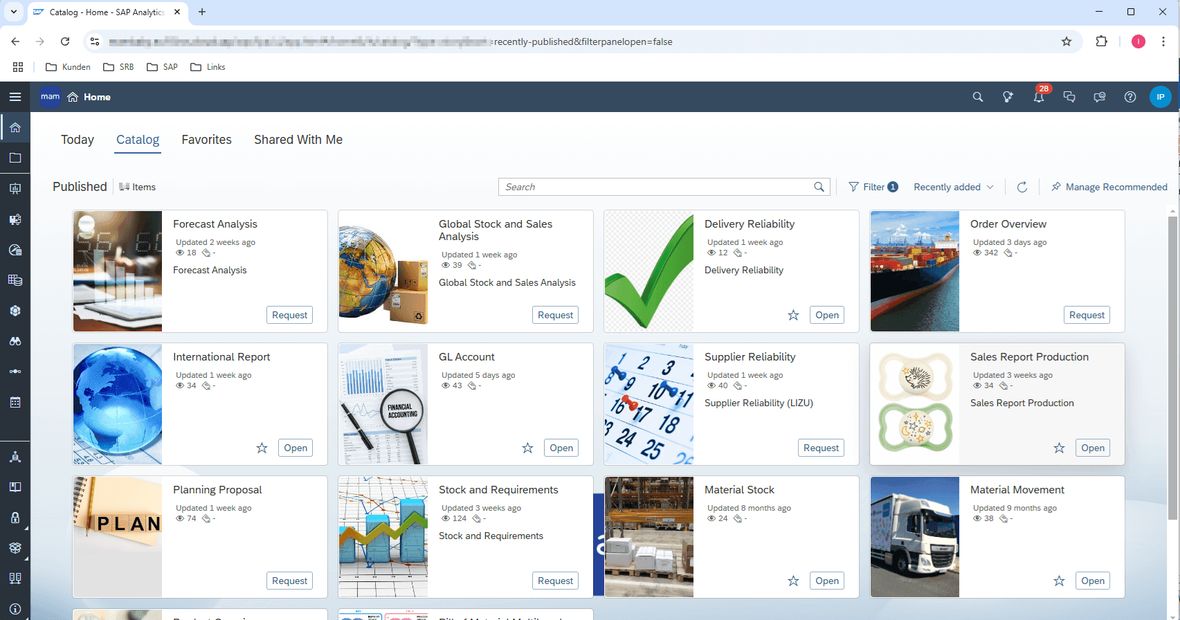
In reporting, the catalog is used. This conceals a simple, central access point for all users. Behind each tile, there may be one or more stories, and of course, each user only receives the authorised tiles and data in the story. The development of the underlying CDS in S/4 and views in Datasphere was mostly carried out by MAM IT. After a joint training and conceptual phase last year, support from SRB was only needed in special cases.
The SAC planning for Sales & Operations is particularly central. Here, data from S/4 is fed in, supplemented, planned, and also returned to S/4.
For MAM, this was a significant step into the future: the SAC planning replaces the previous Excel planning. The data is loaded into a sophisticated system, processed, and planned weekly in the most detailed cases. Data storage takes place in SAC, as this was not technically possible in Datasphere at the project start.
Here is an overview of the data flows, public dimensions, models, and input stories:
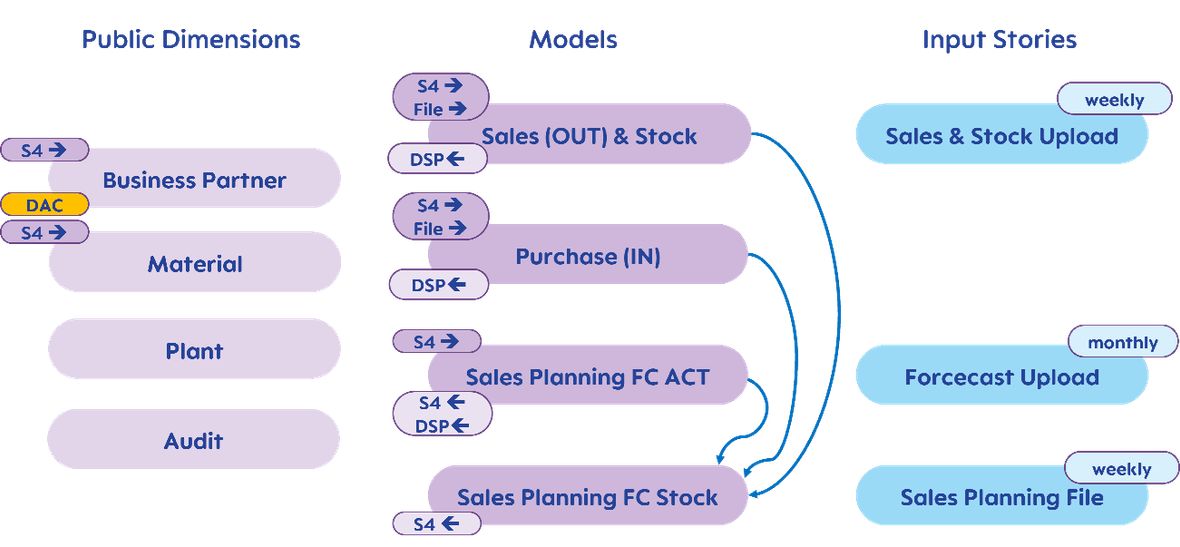
There is a lot of conceptual work behind this. And it was doubly exciting: not only did the planning tool change, but simultaneously the main data source changed from the legacy system to S/4. A major challenge for MAM and also for SRB, as the Excel solution was already complex.
The implementation of the planning solution was handled by SRB, of course in close collaboration with MAM.
And this is what the planning mask for the Sales Planning File (weekly) looks like:
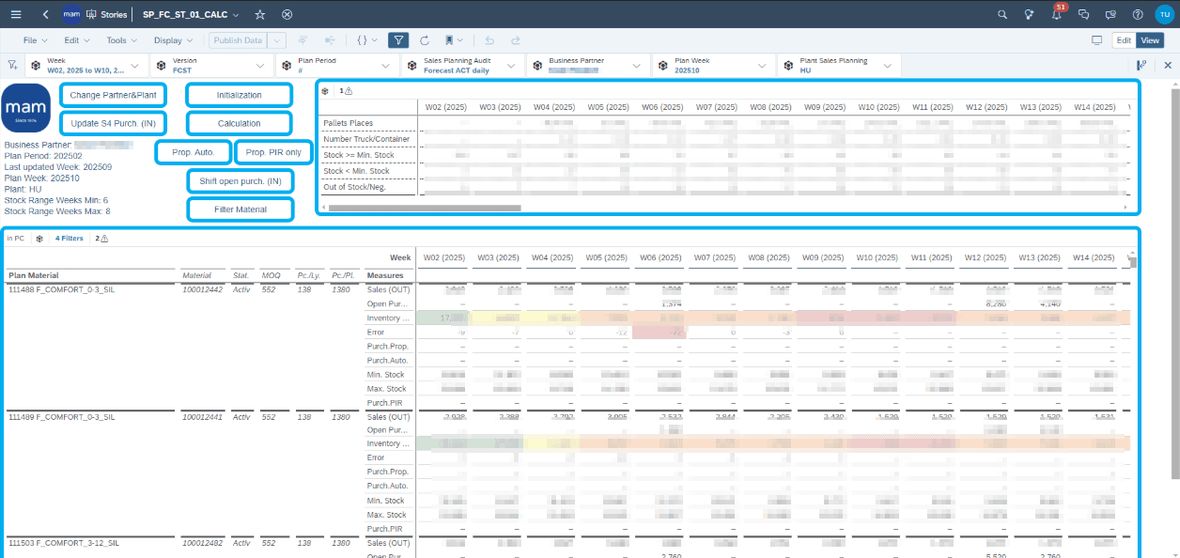
Here, data is proposed and entered at the weekly level. The employee is alerted to bottlenecks by colour-coded cells and supported in their work by various functions.
Realised efficiency increase
The old Excel solution was good, functioned for a long time, and served well – but it also required Excel experts. With SAC planning, several additional advantages can now be achieved:
- Runs in the browser, no VPN, no installation/update needed thanks to the cloud solution
- Transfer of data and generation of S/4 requirements at the push of a button
- Integration into the reporting landscape via DataFlows, automatically executed in the Datasphere.
- Scalable and future-proof, whether new users come on board or entire locations
- With SAC, the full range for graphical design is available
- The planning application uses standard objects and scripting. Therefore, maintenance/expansion/modification can be carried out by anyone knowledgeable in SAC, even externally, if MAM's capacities are tight.
- Central control of permissions, not only for access to the application but also for the content.
- Thanks to the preview tenant, innovations and changes can be tested by SAP in advance. This provides reliability and fail-safety.
In any case, it is great to see how well the transition in reporting from the legacy systems to the cloud has worked. A big shout-out and many thanks to the MAM Reporting department!


