
All good with empty containers? Packaging logistics in SAP

Whether products or trade goods – it is unquestionable that these items are managed in stock and movements are recorded in SAP. Load carriers, however, often lead a shadowy existence. Unjustly so. The SAP standard offers functions to manage these.
Whether production materials, products or trade goods – it is usually hardly a question that these items are managed in stock and all movements are recorded in SAP. Load carriers, however, often lead a shadowy existence. Unjustly so. The SAP standard offers functions to manage these. Which ones, and what needs to be done to use them efficiently, you can read here.
One thing upfront: empty containers, load carriers or packaging – call it what you like. I do too. Of course, there are subtle differences here and there. Nevertheless, I use these terms synonymously in this article. After all, the nomenclature in various SAP documents follows this approach.
Otherwise, the management of empty containers does not fundamentally differ from that for other materials. A number of requirements overlap, while a few apply specifically to these:
- Inventory management and traceability: Movements of empty containers should be recorded both in quantity and value, with a fundamental distinction made between bound and unbound empty containers.
- Planning: Just like direct materials, load carriers are needed for production and can cause downtimes in out-of-stock scenarios. Therefore, they must also be planned to be available at the right place and time.
- Management of loan accounts: Since load carriers are often exchanged throughout the entire supply chain, a tool is needed to track who owns them and where they are located.
- Automatic billing and deposits
SAP has several functions that address these requirements.
- Inventory management
- Handling Unit Management
- Empty container management
- Loan account management
Some of these overlap or cover similar requirements, but in different ways. Depending on the need and environment, it is therefore important to select the appropriate tools from these functions and set them up so that they interact seamlessly.
Inventory management
Like any other material, packaging materials can be recorded in stock and value, provided the designated material type allows it. Furthermore, Extended Warehouse Management (EWM) or Warehouse Management (WM) can be connected to inventory management, as detailed in thisblog post. In the simplest case, empty load carriers are recorded upon receipt in goods receipt and upon consumption to a cost centre or production order. This way, one always has an overview of how many empty packaging materials are available.
If one wants to obtain the same information about bound load carriers, this can be enabled through the use of Handling Unit Management. At goods receipt, direct materials can be packed into handling units, specifying exactly which load carriers and packing aids are used. This way, one knows which handling units are in stock and which packing materials they contain, allowing for the determination of the number of bound load carriers.
At the same time, bound load carriers can also be recorded in stock, with a dedicated storage location recommended solely for bound empty containers. This is particularly important as it not only facilitates the determination of their quantity but also serves as a prerequisite for some of the functions explained further below.
If one does not want to manually pack each material and record the stocks individually, SAP offers the following tools:
Automatic packing
For each packed material, one can maintain one or multi-level packing instructions in the master data, including load carriers and packing aids, as well as a search for these. If done correctly, materials can be automatically packed in incoming or outgoing deliveries.
Automatic generation of delivery items
In Customising, it can be set up that delivery items are automatically generated from the handling units packed in deliveries for the packing materials. For this, the generation of delivery items for packing materials must be enabled in the Customising of the delivery type, and the packing material type must suggest a delivery item generation.
Depending on the item type group in the material master of the packing materials, different item types can be determined for these items in the delivery. These can be configured to behave in specific ways, such as whether they should be transferred to subsequent documents like invoices or recorded in goods movements.
BAdIfor other movements
With the aforementioned methods, automatic goods movements of packing materials can only be generated for those bookings carried out via incoming or outgoing deliveries. However, if a material is simply repacked, no automatic movement of the used or released packaging materials can be generated in the standard.
Here, the SAP BAdI BADI_HU_SAVE helps. The plug-in that runs with every change of a handling unit can be developed and allows for the implementation, for example, that an empty container used for packaging is transferred from a storage location for unbound load carriers to one for bound ones.
Planning
When the stock of empty load carriers is recorded in a timely manner, all prerequisites for correct planning are met. The packaging materials can be planned by MRP like any other material, using all available planning types (consumption and demand-driven) and lot size procedures.
It is important that the stock of bound empty containers is not considered, as these cannot be used for packaging. This is ensured by either not including them in stock at all or by managing them in dedicated storage locations or planning areas that are not considered by demand planning.
Management of loan accounts
For the management of empty container accounts from suppliers or customers, SAP offers two applications with similar functions:
- Empty container management:This originally comes from the Industry Solution for Consumer Products and was developed to manage the handling of reusable transport packaging, including deposit processing, throughout the supply chain.
- Loan account management: This originally comes from the automotive industry. Here, OEMs (Original Equipment Manufacturers) provide their suppliers with empty containers as loaned goods, in which they then package their materials and deliver directly or via third parties. The loan account management was developed to manage these lending and borrowing relationships between business partners.
Empty container management
The prerequisite for using empty container management is the activation of the Enterprise Add-On EA-CP in the ECC Extensions (Business Functions). The following must be set up in Customising:
- Own material type with material identification for empty containers, with quantity valuation being mandatory and value valuation optional.
- Customising of own item types for empty container management (including copy control up to invoicing)
- Customising Sales à Invoicing à Empty Container Valuation Definition of invoice types with empty container valuation Define empty container account holders: Here, it can be defined under which business partner an empty container account is managed for the invoice. Define empty container fields: Which fields of the invoice should be valued in quantity and value? Assign item types to empty container fields Optional: Define empty container groups to group individual empty container materials Optional: Maintain calculation matrix for empty containers to derive an empty container field with arithmetic functions from other fields Set up number range for empty container valuation
Those who have done this must also maintain the following master data for a functioning empty container management:
- Material master: Item type group for empty containers, weights, empty container group
- Customer master: Partner role defined in Customising as account manager, disable empty container valuation, disable empty container valuation
- Bill of materials: through bill of materials type 5 (sales bill of materials), empty container materials can be assigned to a material.
Empty container processing in Materials Management (MM)
When creating the order, full goods including bound empty containers (optionally automatically generated via the bill of materials) or unbound empty containers can be recorded. The prerequisite is the activation of BAdI /BEV1/NE_ITEM_PO for the identification and pre-filling of the account assignment, without which empty container processing in MM does not function. Load carriers returning to the supplier can be recorded as return items.
While bound empty containers are not relevant for goods receipt, unbound empty containers are recorded in stock. When booking the incoming invoice, the quantity and value of the empty containers can be corrected. Furthermore, with the booking, the movements and balances on the empty container account are updated, allowing incoming and returned empty containers to be offset against each other.
Empty container processing in Sales (SD)
When creating the customer order, full goods including bound empty containers (optionally automatically generated via the bill of materials) or unbound empty containers can be recorded. Alternatively, empty containers can also be generated in the form of empty container items in the delivery via packed handling units, as described above.
Incoming empty containers from customers can be represented through return deliveries. However, it must be ensured through copy control that the empty containers end up in the invoice, even if they are free of charge, as only here does the valuation on the empty container accounts take place.
Evaluation of empty container accounts
Movements of bound and unbound empty containers can be evaluated in transaction /BEV1/EMS, with balances per customer and supplier evaluated (and the latter also exported and printed) in transaction /BEV1/EMA.
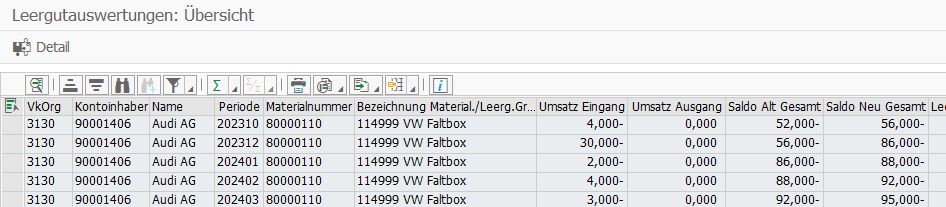
Extract of empty container account
Loan account management
Loan account management is part of all SAP S/4HANA systems, with the following Customising needing to be set up under Materials Management à Loan account management:
- Number ranges for various objects of loan account management (see Customising guide) must be established.
- Account posting types for loan postings must be created.
- Account postings are always linked to material movements, which is why the account posting types must be assigned to MM movement types.
The following master data is required:
- Material master: Item type group for empty containers, weights
- Loan account: It establishes the connection between loaned goods, plant, and customer/supplier (relation). In addition to a main relation, side relations can also be added. For example, bookings from different suppliers or customers can be summarised to one loan account.
Loan account postings
The prerequisite for an account posting is always a material movement of the empty containers. The only exceptions are manual account postings, which only post to one account and do not change stock.
When a loaned good is booked with a relevant MM movement type, an account posting is also triggered. In addition to the plant and loaned good, the goods recipient (supplier and customer) is determined, and a loan account that contains a relation with the three affected objects is posted. If, for example, no goods recipient can be determined or there is no account for the booked relation, the movement is erroneous but can be evaluated and corrected in a separate transaction for erroneous postings.
In addition to automatic postings, manual postings can also be triggered to represent special processes or to follow up on postings.
Evaluation of loan accounts
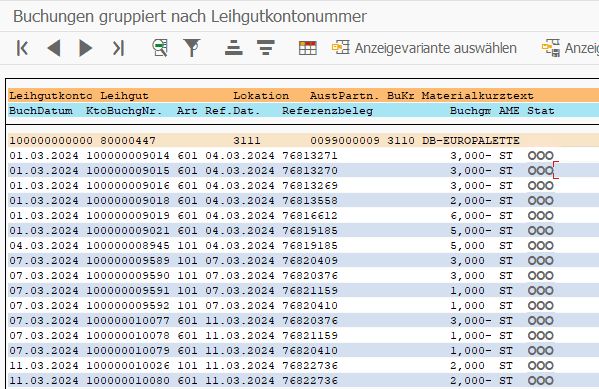
In the SAP menu under Logistics à Materials Management à Loan account management, all movements and accounts can be evaluated according to various selection criteria. Furthermore, account statements can be created, printed, or sent via EDI. After receiving an EDI statement from a partner, the accounts can be reconciled.
Extract of loan account
Conclusion: All good with empty containers
As we have seen and read: empty containers can be recorded in stock like any other material – and with relatively manageable effort. It is worth noting that a distinction can be made between bound and unbound empty containers, thus providing an important prerequisite for professional management. Bookings can always occur automatically when the movement is recorded via incoming or outgoing deliveries and packed in handling units.
Other movements or repacking processes are not supported in the SAP standard, but can be implemented customer-specifically via a BAdI in Handling Unit Management. With a correct stock of load carriers, these can then also be planned in the SAP standard.
The exchange of load carriers with business partners can be represented with the functions of empty container management and loan account management. The empty container management is booked during invoicing and is designed to settle the exchange of empty containers, including deposits, with business partners. The loan account management, on the other hand, serves to record which partners owe an empty container or to whom one owes load carriers. The accounts are booked with goods movements, and their strengths lie in flexibility (different goods recipients can be summarised to one account) and in an automated reconciliation via EDI of all movements between business partners.
All in all, it can be concluded: everything is good with empty containers! Those who want a complete overview of their inventory management must and should integrate packaging logistics into SAP. And those who need support with 'packing' will be gladly assisted by us at SRB.


